Monitoring Production AI: Drift and Hallucinations
AI systems degrade silently. How to trace every call, score answer quality automatically and alert on quality, not just uptime.
Moin Dalal
October 4, 2026
AI systems get worse quietly. A model that was right 95% of the time last month might be right 78% of the time today, and nobody notices until customers complain. Most teams watch their servers: how busy the processor is (CPU), how much memory is used, and whether the site is up. They do not watch how the AI behaves. Are the answers still good? How often does it make things up? Is it finding the right documents? A server can be perfectly healthy while the answers it gives slowly get worse.
What is missing is a clear view of what the live system is doing (observability). Not for the servers, but for the AI itself. The question it must answer is simple: is the system still giving good answers? This post shows how to build that view, based on Sentinel, the monitoring platform I am designing for chains of AI steps (pipelines). Sentinel is planned, not built yet (October 2026), so this post describes the design, not results.
Why ordinary monitoring misses it
Normal monitoring answers two questions: is it up, and is it fast? Both can be true while quality falls apart. Here are a few ways that happens:
- A data source changes shape. The step that looks up documents to answer from (retrieval) starts returning weaker matches for one topic. Answers get vaguer, but no error is ever raised.
- A model or its instructions change. Behaviour shifts in small ways that pass a quick manual check.
- The questions change. Users start asking things the system was never tuned for. Quality drops on exactly the traffic that is growing.
None of these sets off an uptime alarm. You find out from a customer, which is the most costly way to find out.
Three layers of monitoring
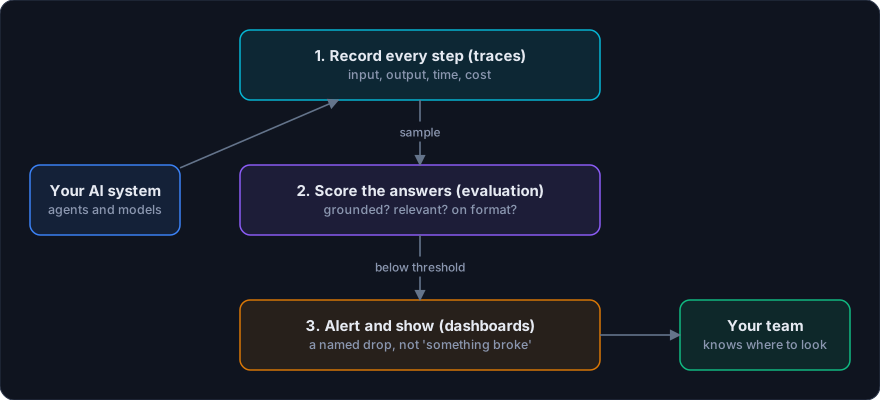
Sentinel is designed to plug into any system built on a large AI text model (LLM) with a few lines of tracking code. It will give you three layers.
Layer one: record every step
Every model call, every tool the agent uses and every choice it makes is saved as a step-by-step record, using an open-source tracing tool (LangFuse). Each record holds the full question and answer, how long the answer took (latency), how many word pieces it used (tokens), and any labels you add. Without these records you cannot investigate anything, because you cannot see what the system actually did.
Two things matter here. First, coverage. If some calls are not recorded, the blind spots are exactly where problems hide, so Sentinel aims to record everything. Second, cost. Tracking that slows the system down gets switched off. So Sentinel’s tracking has to add so little time per call that nobody has a reason to turn it off.
Layer two: score the answers
Records tell you what happened. Scoring tells you whether it was good. Automatic checkers run on a sample of the records. They check four things: is the answer backed by the sources, is it on topic, did it follow the instructions, and is it in the right format?
Each check returns a score in a fixed format. This is where a data-checking library (Pydantic) earns its place. When a checker rates an answer, I need a proper score, not a sentence that might say “7/10”, “seven out of ten” or “pretty good”. Forcing a fixed shape on the output (schema) means scores can be averaged, tracked over time and compared day to day.
Checking a sample is a deliberate choice. Scoring every record with a model is expensive. A sample gives a reliable picture of quality at a fraction of the cost. And when something looks off, you can check more.
Layer three: alerts and dashboards
When a quality score crosses a limit you set, an alert goes out. The key is being specific. “Something is wrong” does not tell anyone what to do. A useful alert looks like this: for finance questions, the share of relevant documents found dropped below 85% over the last four hours. That tells you where to look and roughly when it started.
The dashboards are fed by web addresses the server answers (endpoints) built with a Python web framework (FastAPI). They update live over a connection that stays open (WebSocket), so you watch quality move as it happens instead of reading yesterday’s report.
Where the data lives is a design choice
Many large companies cannot send these records to an outside online service (SaaS). The records hold full questions and answers, which may include customer details or private business data. That is why I chose LangFuse for this project. It is open source and can run on the client’s own servers, so they keep full control of the data.
The records are stored in a database (PostgreSQL), because the data is naturally linked. Steps belong to records, records belong to sessions, and sessions belong to users. That database handles those links well. It also has flexible columns for extra labels (JSONB) and fast lookups by time.
Check for made-up answers on their own
An answer that sounds right but is not supported by the source (hallucination) deserves its own score. The way to catch it is to compare the answer with the documents the system actually found. If a claim is not backed by those documents, flag it.
You can also put a check in the live path, not just in monitoring. In the design for Athena, a planned system, a checking agent reviews every answer against the source data before the user sees it. Sentinel would then watch how often that checker rejects answers, and why. A rising rejection rate is an early warning that something earlier in the chain has changed. The post on multi-agent systems for business intelligence explains that design in more depth.
A practical starting point
You do not need to build everything at once. In order of value:
- Record everything. Start saving a step-by-step record of every call. You cannot score what you did not record.
- Pick two or three quality questions that fit your product, such as “is the answer backed by the documents found?”. Score a sample of records against them.
- Set one alert per quality score, for one topic or feature. A single overall average can hide a local problem.
- Review the failures every week. The worst-scored records show you what to fix next.
Mistakes to avoid
- Alerting on averages only. A healthy overall average can hide one broken topic.
- Scores written as sentences. If checkers return prose, you cannot track them.
- Heavy tracking code. If it makes answers noticeably slower, someone will remove it.
- Sending private records to a service you do not control when your data rules forbid it.
The short version
Watch the quality of the answers, not just the health of the servers. Record every call cheaply. Score a sample with checkers that return fixed-format scores. And alert on specific drops, with the topic and the time window attached. Do this, and quiet decline stops being quiet.
The full design, including the reasons behind each tool, is in the Sentinel case study. If your AI system is already live and you are not sure how it is really doing, book a call.