Connect AI Agents to Company Tools with MCP
Why every AI tool integration becomes a custom job, and how an MCP gateway adds authentication, rate limiting and caching in one place.
Moin Dalal
October 4, 2026
Every time you connect an AI tool to a company system, it is a custom job. Connect an AI model that reads and writes text (language model) to Salesforce, and you write custom code. Connect it to Jira, and you write different custom code. Connect it to an in-house database, and you write a third kind. Now multiply that by every model, every tool and every team. The work grows much faster than the number of parts. Each new model or tool does not add one job. It adds a job for every model or tool already there.
A shared standard called the Model Context Protocol (MCP) fixes the first half of that problem. It sets one way for AI models to talk to outside tools. But a standard for how systems talk (protocol) is only a set of rules. Someone still has to build the front door, check who is calling, limit how often they call, and make the whole thing safe for a large company. This post explains how, using Nexus, a gateway for MCP I am designing (not built yet, October 2026).
What a gateway changes
Without a gateway, every agent talks to every tool directly. Passwords and keys are spread across many codebases. Each connection handles errors in its own way. And nobody has one place to see or limit what the agents are doing.
A gateway sits between any AI model and any company tool. One gateway, one standard, and no custom code per tool. Agents speak MCP to the gateway. The gateway deals with the messy details of each system behind it (backend). The key gain is that security and control now live in one place.
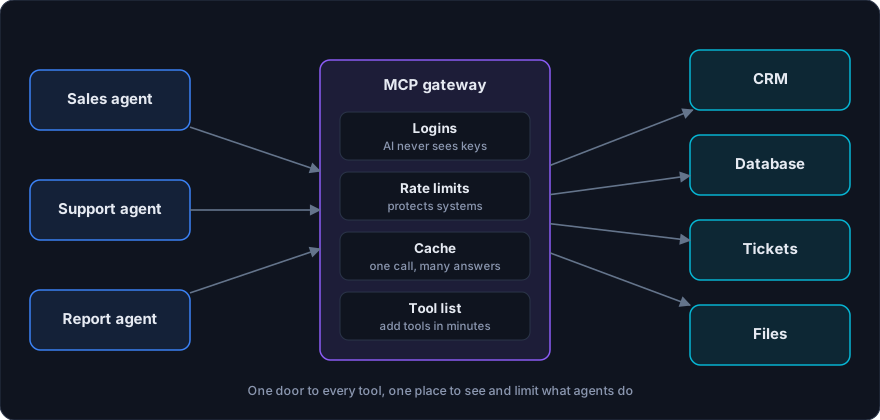
The building blocks
The core gateway
Nexus, my planned gateway (not built yet, October 2026, so this post describes the design, not results), is a small web server built with a Python web framework (FastAPI), that will follow the MCP rules. It will take tool requests from any app that speaks MCP. It will send each one to the right system and return a tidy answer. It will also check that each request is well formed before passing it on.
I chose FastAPI for three reasons. It handles many requests at once without waiting on each one (async). It writes a machine-readable description of every request it accepts (OpenAPI) for free. And MCP tool definitions fit neatly into its data-checking library (Pydantic). Each request also carries its login details cleanly through a built-in way of handing shared pieces to each request (dependency injection).
Logins the model never sees
Company tools need login details: keys for program access (API keys, OAuth tokens), or shared service accounts. The rule that matters most is simple. The AI model should never see them. If a key shows up in the text sent to the model (prompt) or in a tool result, it can leak into logs, chat records or an attacker’s output.
Nexus will add the login details at the last moment. The model asks for a tool, and only then, just before the call goes out, Nexus attaches the key. The keys are stored encrypted in a database (PostgreSQL), and they can be rotated on a schedule. From the model’s side, it asks for an action and gets a result. It never touches a secret.
Limits that protect your systems
Agents can be over-eager. A loop or a badly behaved session can hit a system with thousands of calls. Nexus will cap how many calls each session may make in a given time (rate limiting), so no single session can swamp the systems behind it.
Those caps are kept in a fast shared memory store (Redis), not inside each copy of the gateway. That matters at scale. When several copies of Nexus run behind a traffic splitter (load balancer), the caps must be shared across all of them. A counter kept inside each copy would let a busy session dodge its cap by spreading calls across copies.
Saved answers that save money and time
Many agents ask the same question at the same moment. If ten agents ask for the same Jira ticket within thirty seconds, only one request should reach Jira. Nexus will keep a short-lived copy of recent answers (cache). That cuts repeat calls, shortens the wait for an answer (latency) and keeps you inside your usage limits.
A tool list that makes new tools cheap
New tools are added by writing a short settings file in a simple text format (YAML). You write the tool’s name, what it does, the shape of the data it accepts (schema), how it logs in, and the web address it calls (endpoint). Nexus then builds the MCP tool definition for you. Adding a new company tool takes minutes, not days. That is the whole point of the design: the cost of the next connection stops growing.
Deployment: run where your data lives
Companies run in the cloud, on their own servers, or a mix of both. So the gateway has to run anywhere. It ships as a sealed, ready-to-run package (Docker container). Each tool connection can run as its own small helper package next to the gateway (sidecar), with its own parts. That way, a problem in one connection cannot break another.
Security questions to ask of any gateway
Whether you build one or buy one, ask these:
- Where do keys live, and can the model ever see them?
- Is there a cap per session, and is it shared across every copy?
- Can I add or remove a tool without restarting everything?
- Can I see every call each agent made, and who made it? The last one is why the ability to see what a live system is doing (observability) matters. A gateway sees every tool call, so it is a natural place to feed a monitoring system like the one in monitoring and evaluating production AI.
What to measure
When Nexus is built, the numbers to watch are: how many tools it connects, the typical (median) response time, how long a new tool takes to add, and how many sessions it holds at once. The one I care about most is how fast a new tool goes in. It shows whether the design really stopped the cost from growing.
When you do not need a gateway
If you have one model and one or two tools, a direct connection is simpler. A gateway would add moving parts you do not need. The case for a gateway grows with the number of models, tools and teams. It also grows with how much you care about keys, limits and seeing what happens.
The short version
Use MCP as the standard, and put one gateway between your models and your tools. Keep keys out of the model’s sight. Share call limits across every copy. Save repeat answers. And add new tools through a settings file instead of new code. The next connection becomes a short file, not a project.
The full design is in the Nexus case study. If you are connecting agents to company tools and want to do it safely, book a call.